📁 PHP Dosya Yöneticisi
/
/
home
/
demodesigncom
/
belediyescripti.demodesign.com.tr
/
yonetim
/
vendors
/
datetimepicker
📝
README.md
← Geri Dön
# jQuery DateTimePicker [Demo and Documentation](https://xdsoft.net/jqplugins/datetimepicker/) [](https://travis-ci.org/xdan/datetimepicker) [](https://badge.fury.io/js/jquery-datetimepicker) [](https://www.npmjs.com/package/jquery-datetimepicker) PLEASE. Help me update documentation. [Doc.tpl](https://github.com/xdan/datetimepicker/blob/master/doc.tpl) This file will be automatically displayed on the site # Installation ```bash npm install jquery-datetimepicker ``` OR ```bash yarn add jquery-datetimepicker ``` or download [zip](https://github.com/xdan/datetimepicker/releases) # datetimepicker ============== **!!! The latest version of the options 'lang' obsolete. The language setting is now global. !!!** Use this: ```javascript jQuery.datetimepicker.setLocale('en'); ``` [Documentation][doc] jQuery Plugin Date and Time Picker DateTimePicker  DatePicker  TimePicker  Options to highlight individual dates or periods   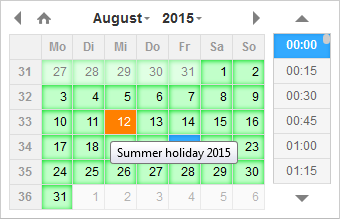 [doc]: https://xdsoft.net/jqplugins/datetimepicker/ ### JS Build help **Requires Node and NPM** [Download and install node.js](http://nodejs.org/download/). Install: 1. Install `bower` globally with `npm install -g bower`. 2. Run `npm install`. npm will look at `package.json` and automatically install the necessary dependencies. 3. Run `bower install`, which installs front-end packages defined in `bower.json`. Notice: If you use Bower v1.5.2, you will get error: `The "main" field cannot contain minified files` You can regress to version 1.3.12 1. `npm uninstall bower -g` 2. `npm install -g bower@1.3.12` Build: First install npm requirements: `npm install -g uglifycss concat-cli` Then build the files: `npm run build` When build completed, you'll have the following files: - **build/jquery.datetimepicker.full.js** - browser file - **build/jquery.datetimepicker.full.min.js** - browser minified file - **build/jquery.datetimepicker.min.js** - amd module style minified file
💾 Kaydet
İptal
📝 Yeniden Adlandır
İptal
Kaydet
🔐 Dosya İzinleri (chmod)
İzin Değeri:
Hızlı Seçim:
777
755
644
600
777
= Herkes okur/yazar/çalıştırır
755
= Sahip tam, diğerleri okur/çalıştırır
644
= Sahip okur/yazar, diğerleri okur
600
= Sadece sahip okur/yazar
İptal
Uygula